Text messages and consent
Get shift reminders, waitlist offers and messages from an organization by text as well as by email, and stop them whenever you like.
Texts are optional. Email always comes; texts are an extra for people who want their reminders on their phone. You only get texts after you give a mobile number and tick the consent box.
Where to find it
- On the signup form, the series form and the application form: Mobile number for texts (optional).
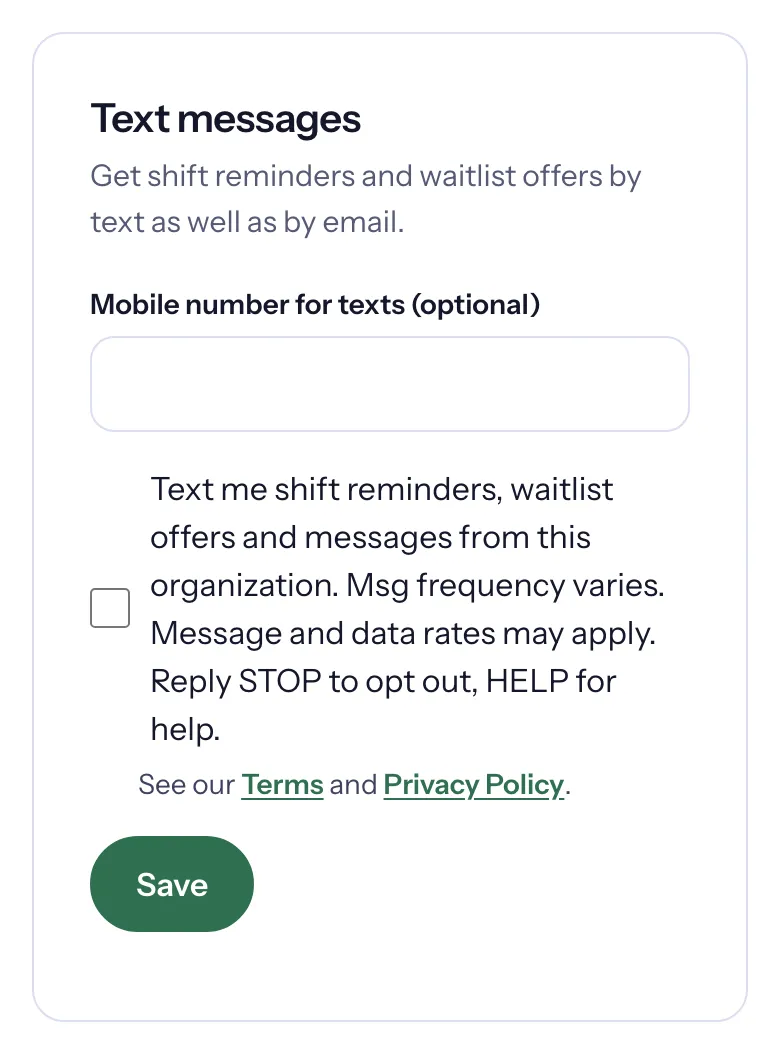
- Once you are logged in: your profile's Text messages card, where you add, change or stop your number.
What you agree to
The box next to the number reads:
Text me shift reminders, waitlist offers and messages from this organization. Msg frequency varies. Message and data rates may apply. Reply STOP to opt out, HELP for help.
A link to the Terms and the Privacy Policy follows it. Texts need both the number and the ticked box: "Enter a mobile number and tick the box to receive texts."
What you will get
- Shift reminders, about 24 hours before each shift, alongside the reminder email.
- Waitlist offers, when a spot opens and is held for you, with the time to claim it by.
- Messages from the organization: news or changes its team writes to volunteers.
Each text starts with the organization's name and is short: at most 300 characters.
Add your number from your profile
- Log in to the portal and open your profile (Edit your details on My shifts).
- In Text messages, enter your Mobile number for texts (optional) and tick the box.
- Choose Save. "Your mobile number was saved. We will text your shift reminders, waitlist offers and messages from this organization."
A number saved from your profile gets texts with your private links, so you can open your shifts or claim a spot straight from the text. A number typed on a public form gets texts without those links ("Details are in your email"), and you get an email saying "Texts will go to" that number, so you can remove it if it is not yours.
Stop texts
- For one organization: in Text messages, choose Stop texts, then Yes, stop texts. "Texts stopped. We will still email you." To start again, enter your number again and save.
- For everything: reply STOP to any Causefolk text. That stops texts to your number from every organization on Causefolk. Reply START from the same number to get them again.
- Reply HELP for a short help message.
Stopping texts never stops your emails.